Control Hub
Launch - design, test, and ship the multi-agent system that runs your use case.
Control Hub is where your AI use case becomes a production-ready application. You arrive here after clicking Design App on a use case in the Jamming Board, or after selecting and configuring a blueprint from the Blueprints page.
The Outcome
An agent system that has been designed, run against real inputs, and deployed to production infrastructure.
Before You Start
Control Hub assumes the Align foundations are in place:
- The knowledge your agents reason over is loaded - see Data
- The systems your agents call are connected - see Tool Integrations
- The boundaries your agents operate inside are decided - see Governance & Guardrails
You can design agents before any of that exists, but they will have nothing to reason over and nothing to act on. Foundations first, agents second.
Start Here
The left panel has three sections: Agentic Workflows, Agentic System, and Data. The Test Bed and Deploy flows are accessed from within Agentic Workflows.
Start in Agentic Workflows and read what the Workflow Architect already generated for your use case before changing anything. Correcting a generated plan is faster than designing one from scratch.
Agentic Workflows
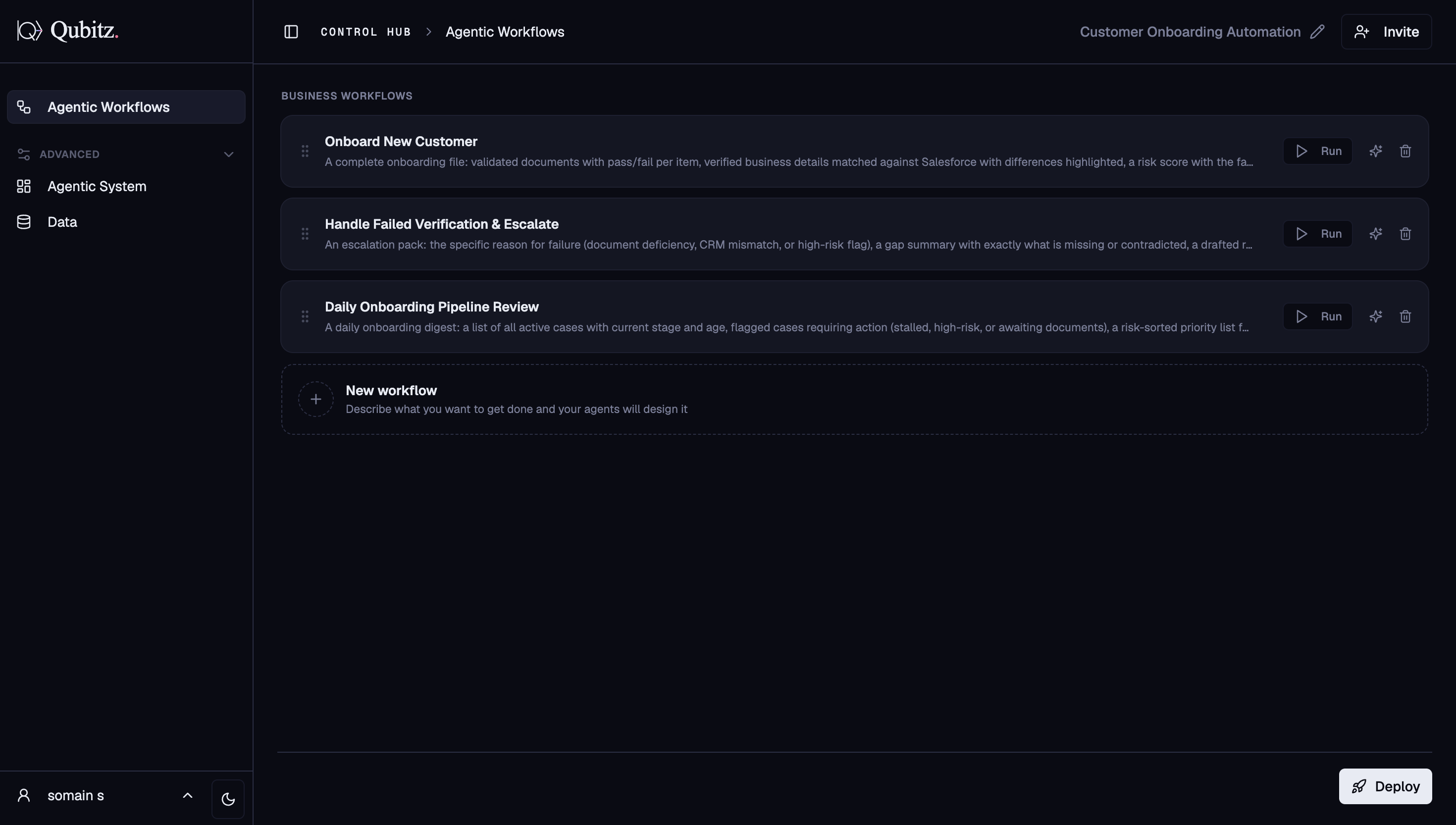
The Workflow Architect generates multi-step agentic workflow plans tailored to your use case. Each workflow is listed as a card showing its name, deliverable summary, and a Run button.
- Run - opens the Test Bed for that workflow
- Deploy button - opens the deployment dialog (Qubitz Cloud or BYOC)
- New workflow card - describe what you want and your agents will design it
- Workflow cap: 30 per project (300 KB total, 24 KB per workflow); the platform warns before you hit the limit
Agentic System
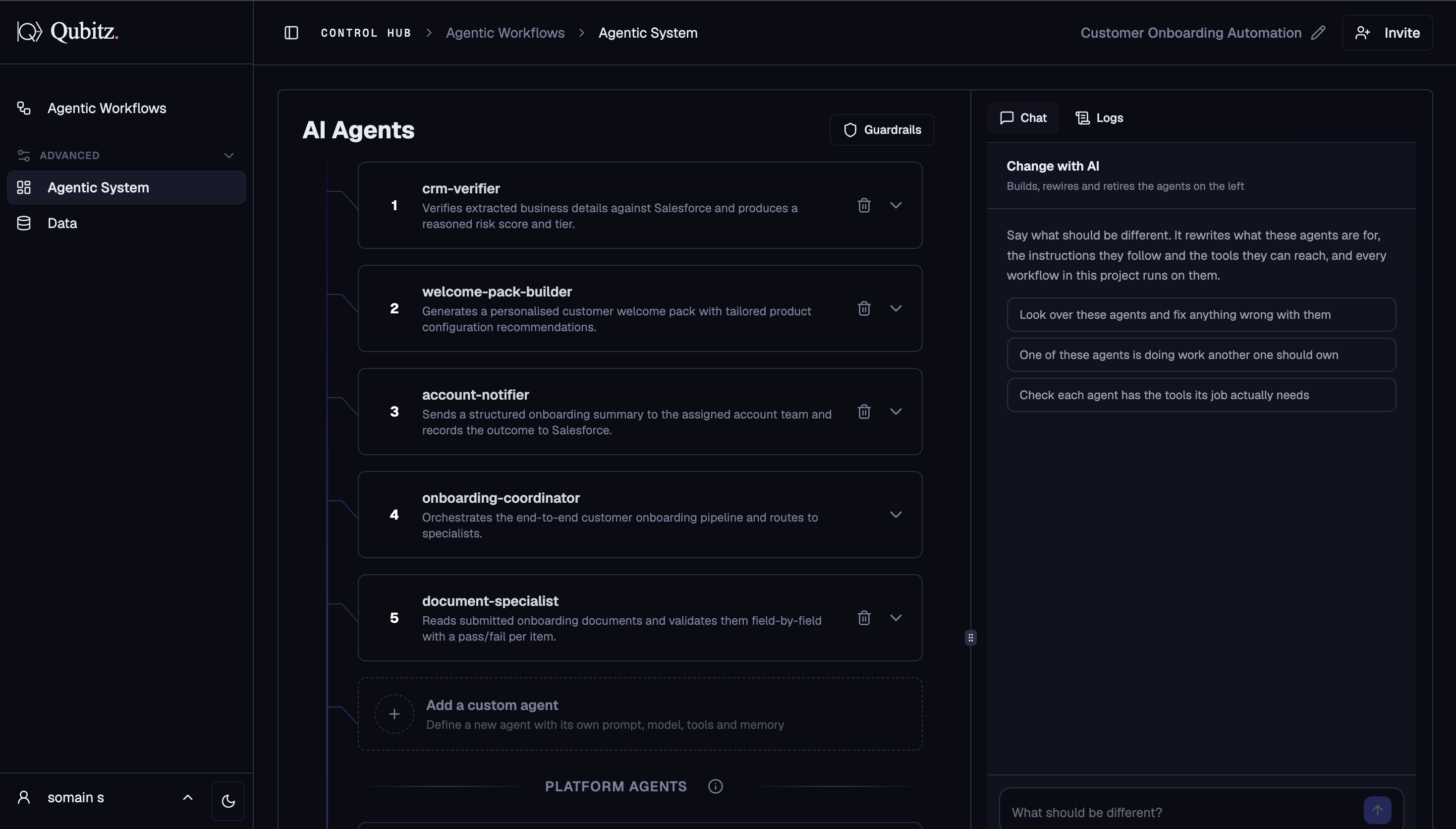
The Workflow Architect runs in agent-design mode to generate a multi-agent architecture. Each agent appears as a numbered card you can expand to edit.
- Agents - name, description, model, tools, memory, visibility, system prompt, agent-as-a-tool settings
- Change with AI panel - describe what should be different; the Workflow Architect rewrites agents, instructions, and tools in place
- Guardrails - content safety rules applied across all agents
- Add a custom agent - define a new agent from scratch
- Platform Agents - system-level agents for infrastructure, security, and observability
- Deployment to AWS Bedrock AgentCore fires automatically once the spec is ready
Data
Four sub-tabs for feeding your agents with domain knowledge:
- Knowledge Base - upload documents (PDF, DOCX, PPTX, XLSX, TXT, Markdown) that agents reference via RAG; organised into named collections bound to specific agents
- Structured Data - CSV files and database connections agents can count, filter, and query for exact numbers
- Connections - third-party integrations: databases, APIs, MCP servers
- Graph RAG - build a domain property knowledge graph from your documents, visualized with Cytoscape.js and queryable as a structured agent tool at runtime
Test Bed
Opens per workflow run when you click Run on any workflow card. Connects directly to your AgentCore runtime and streams the full run including agent activity, structured results, generated documents, evaluation scores, and safety & stress testing.
Deploy
The Deploy button opens a dialog with two options: Qubitz Cloud (managed deployment in Qubitz's AWS account) and BYOC (deploy into your own AWS account). After deployment, go to App Generator in Application Management to build and deploy the customer-facing web app.
What Good Looks Like
- Every workflow card names a deliverable someone would actually ask for, not a generic set of steps
- Each agent has a model, tools, and a system prompt that match the job it owns
- Agents are bound to the data they need - a knowledge collection, a structured dataset, or the graph
- At least one workflow has been run end to end in the Test Bed and its output read, not just watched
- The deployment target (Qubitz Cloud or BYOC) was a decision, not a default
Where This Leads
- Getting Started - the ordered walkthrough from entering Control Hub to a live application, if you would rather follow steps than explore tabs.
- Agentic Workflows - the first section you work in, and where Run and Deploy live.
- Application Management - Operate, where a deployed system is monitored, secured, and costed.