GraphRAG
Build a structured property graph of your domain from your own documents, so agents can traverse relationships instead of inferring them from retrieved text.
GraphRAG lets you construct, visualize, and evolve a structured property graph of your problem domain - built directly from your uploaded documents. Agents can query the graph at runtime for precise, structured relationship lookups alongside standard document RAG.
The Outcome
Your agents can traverse a grounded map of how the entities in your domain relate, rather than inferring those relationships from retrieved passages.
Before You Start
GraphRAG builds from documents that are already in the platform. Upload them to the Knowledge Base first - see Data.
Have a plain-language description of your domain ready. The build starts from that description, so the sharper it is, the closer the extracted entities and relationships will be to the vocabulary your team actually uses.
Not every use case needs a graph. If the questions are answered by retrieving passages of text, document RAG on its own is enough. A graph pays for itself where the relationships between entities carry the meaning.
Start Here
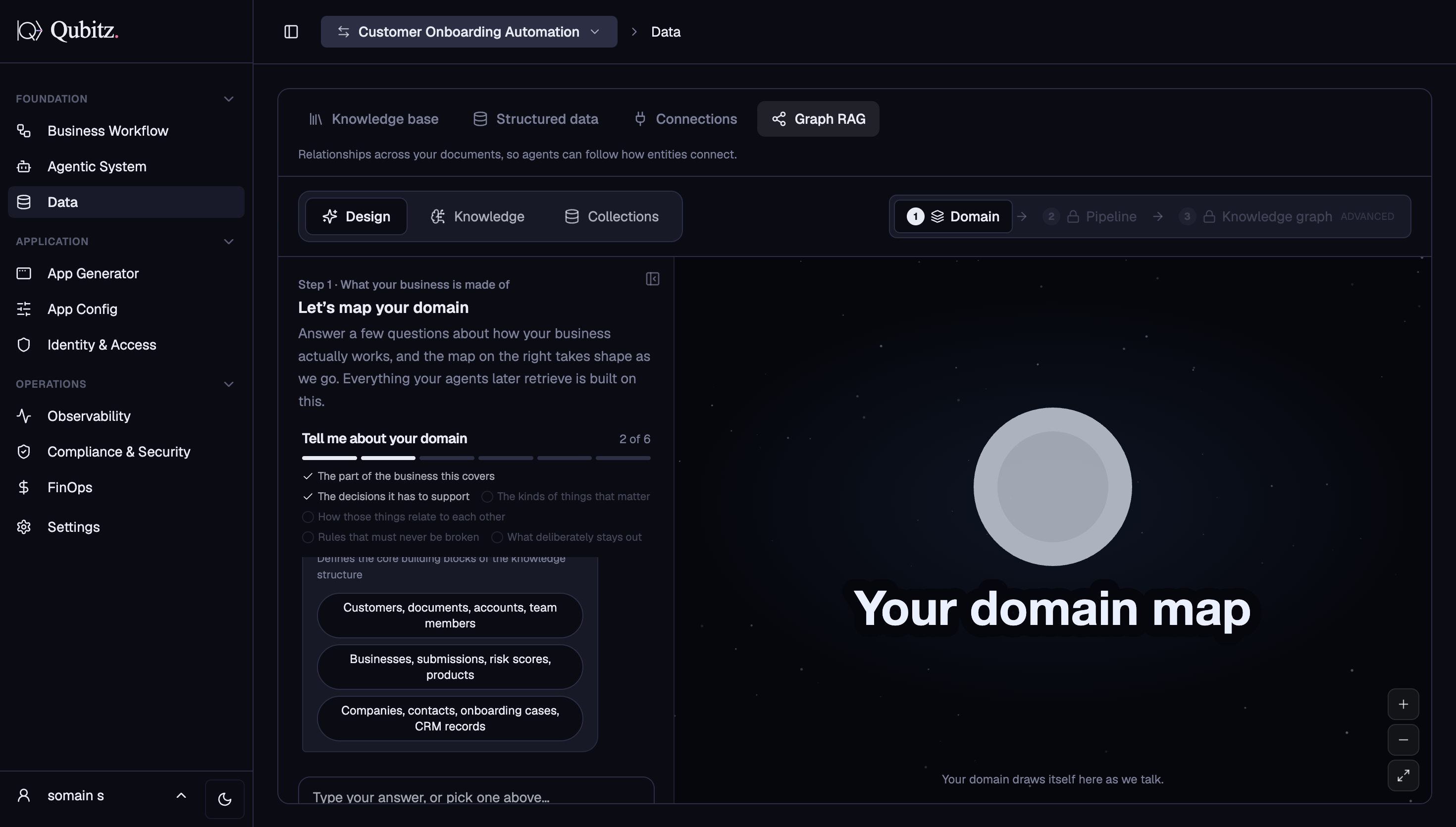
Access GraphRAG from the Data tab → Graph RAG sub-tab in Control Hub, then click Build and describe the domain you want to map.
What It Does
A domain knowledge graph gives your agents structured context about how concepts in your domain relate to each other. Instead of relying solely on unstructured document retrieval, agents traverse the graph to find precise relationships between entities - products, processes, regulations, people, risks, or any domain concept.
GraphRAG supports two modes:
- Build - construct the initial graph from your documents and a domain description
- Edit - incrementally update the graph to add, remove, or modify nodes and edges
How to Build a Graph
Open Graph RAG
In Control Hub, switch to the Data section and select the Graph RAG sub-tab.
Describe Your Domain
Click Build and describe the domain you want to map. The GraphRag Agent reads your uploaded documents, extracts entities (nodes) and relationships (edges), and streams the graph back live as it builds.
Review the Canvas
The generated graph loads in the interactive Cytoscape.js canvas:
- Nodes are color-coded by type
- Edges are labeled with their relationship type and direction
- Click any node to inspect its properties and evidence citations
- Pan, zoom, and drag to rearrange the layout
- Each node and edge links back to the exact document chunk that grounded it
Edit and Refine
Use the chat panel to describe changes in plain language:
- "Add a relationship between Policy and Claim"
- "Remove all nodes with confidence below 0.7"
- "Rename Borrower to Applicant"
The agent applies only the described changes - it never regenerates the graph from scratch.
Save and Use
The graph is automatically versioned and stored in S3. Your agents can reference the graph during task execution for structured, domain-aware relationship lookups.
Pipeline Configuration
A Mermaid pipeline panel shows the logical processing stages (ingestion → extraction → graph_store → retriever → guardrails → quality_gates). Each stage is configurable from the inspector:
| Stage | What It Controls |
|---|---|
| ingestion | Document chunking and preprocessing |
| extraction | Entity and relation extraction parameters |
| graph_store | Storage format and versioning |
| retriever | How agents query the graph at runtime |
| guardrails | Content filtering and safety thresholds |
| quality_gates | Grounding requirements (min 0.9 confidence by default) |
Graph Storage
Each graph is stored as a versioned JSON artifact in S3 at graphs/{graph_id}/rev-{n}.json. Every edit creates a new revision without overwriting prior ones. If two edits collide, you are shown the latest revision to retry from.
A Mermaid diagram export is also available alongside the interactive canvas, suitable for embedding in documentation.
What Good Looks Like
- Node and edge labels read in your domain's own vocabulary - if the graph says Borrower and your team says Applicant, rename it
- The nodes and edges your agents will depend on each link back to the document chunk that grounded them
- Low-confidence nodes have been inspected and either kept deliberately or removed
- Refinements go through the chat panel as incremental edits, so each change lands as its own revision you can retrace
- The pipeline stages have been reviewed rather than left unread, in particular quality_gates and its grounding requirement
Where This Leads
- Tool Integrations - connect the live systems your agents act against, alongside the knowledge they read
- Governance & Guardrails - set the access and compliance boundaries before agents query any of this at runtime
- Agentic System - Launch, where you configure the agents that will use the graph