Artifacts
Where Envision deliverables are stored, versioned, viewed, and regenerated for different audiences.
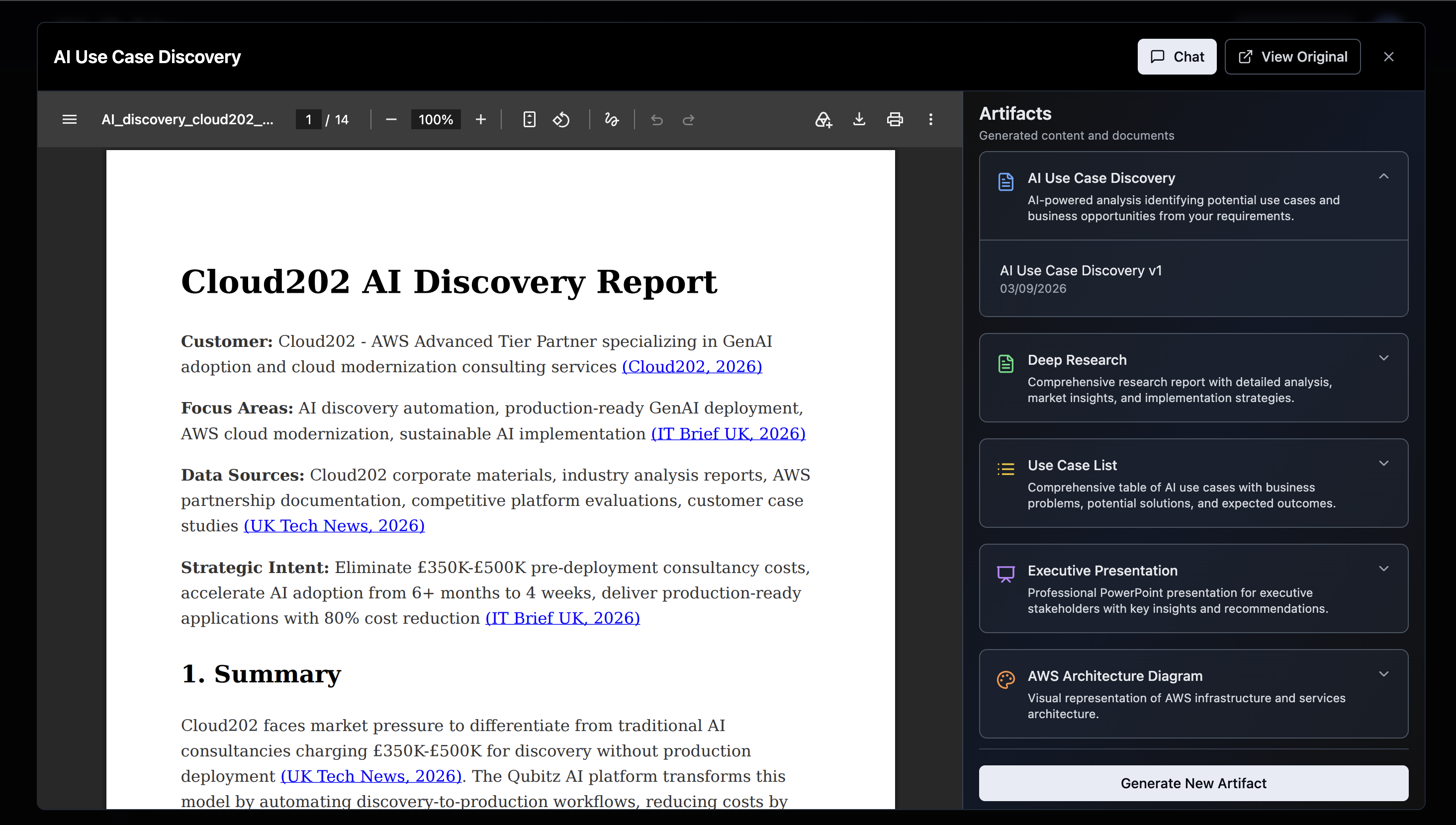
The Artifacts panel is Qubitz AI's document management and generation hub. Open it from the Artifacts button in the Jamming Board header. It stores all generated deliverables, provides an integrated PDF viewer with AI chat, and lets you generate additional artifacts on demand.
The Outcome
Every deliverable from your assessment run in one place, versioned, and reshaped for whichever audience has to approve the work.
Before You Start
You need a completed pipeline run - see Getting Started. AI Use Case Discovery, Deep Research, and Use Case List are produced automatically during the run. Executive Presentation and AWS Architecture Diagram exist only once you ask for them.
If you took the full AI Readiness route, your six scored PDF reports are in this panel too - Reading Your Readiness Reports covers what each one is for.
Know who the artifact is for before you generate it. The instructions field is what separates a useful document from a generic one, and that depends entirely on the audience.
Start Here
Open the Artifacts button in the Jamming Board header and read AI Use Case Discovery first. It is the structured view of what the run concluded, and everything else in the panel expands on part of it.
Layout
The Artifacts view has two areas:
- Left - PDF viewer. Displays the currently selected artifact. Full toolbar: page navigation, zoom, rotate, download, print.
- Right - Artifacts panel ("Generated content and documents"). Lists all artifact categories. Expand any category to see versions with dates. Select a version to load it in the viewer.
- Chat / View Original - Buttons in the top-right. Chat switches the right panel to an AI chat interface where you can ask questions about the open document. View Original opens the source file directly.
Artifact Types
Five artifact types are available:
| Type | Icon | Description |
|---|---|---|
| AI Use Case Discovery | Document (blue) | AI-powered analysis identifying potential use cases and business opportunities from your requirements |
| Deep Research | Document (green) | Comprehensive research report with detailed analysis, market insights, and implementation strategies |
| Use Case List | List (green) | Comprehensive table of AI use cases with business problems, potential solutions, and expected outcomes |
| Executive Presentation | Presentation (purple) | Professional PowerPoint for executive stakeholders with key insights and recommendations |
| AWS Architecture Diagram | Diagram (orange) | Visual representation of AWS infrastructure and services architecture |
The first three (AI Use Case Discovery, Deep Research, Use Case List) are auto-generated during the pipeline run. Executive Presentation and AWS Architecture Diagram are generated on demand.
Artifact Versioning
Every artifact supports versioning. Expand a category in the panel to see all generated versions with creation dates:
AI Use Case Discovery
  └── AI Use Case Discovery v1 - 03/09/2026
Deep Research
  └── Deep Research v1 - 03/09/2026
Each regeneration creates a new version (v2, v3...) without overwriting previous versions. Select any version to open it in the viewer.
Generating New Artifacts
Click Generate New Artifact at the bottom of the Artifacts panel. Select an artifact type - different fields appear depending on type:
| Artifact Type | Required Inputs |
|---|---|
| AI Use Case Discovery | Custom instructions (text) |
| Deep Research | Custom instructions (text) |
| Use Case List | Custom instructions (text) |
| Executive Presentation | AI Discovery Report version, Tone |
| AWS Architecture Diagram | Select use case from dropdown |
Example instructions for regenerating a report:
- "Focus more on healthcare verticals and HIPAA compliance"
- "Make the tone more executive-friendly with less technical detail"
- "Add a section on data governance and privacy"
- "Include more quantified ROI projections"
Regeneration always creates a new version - it never overwrites the original.
AWS Architecture Diagram
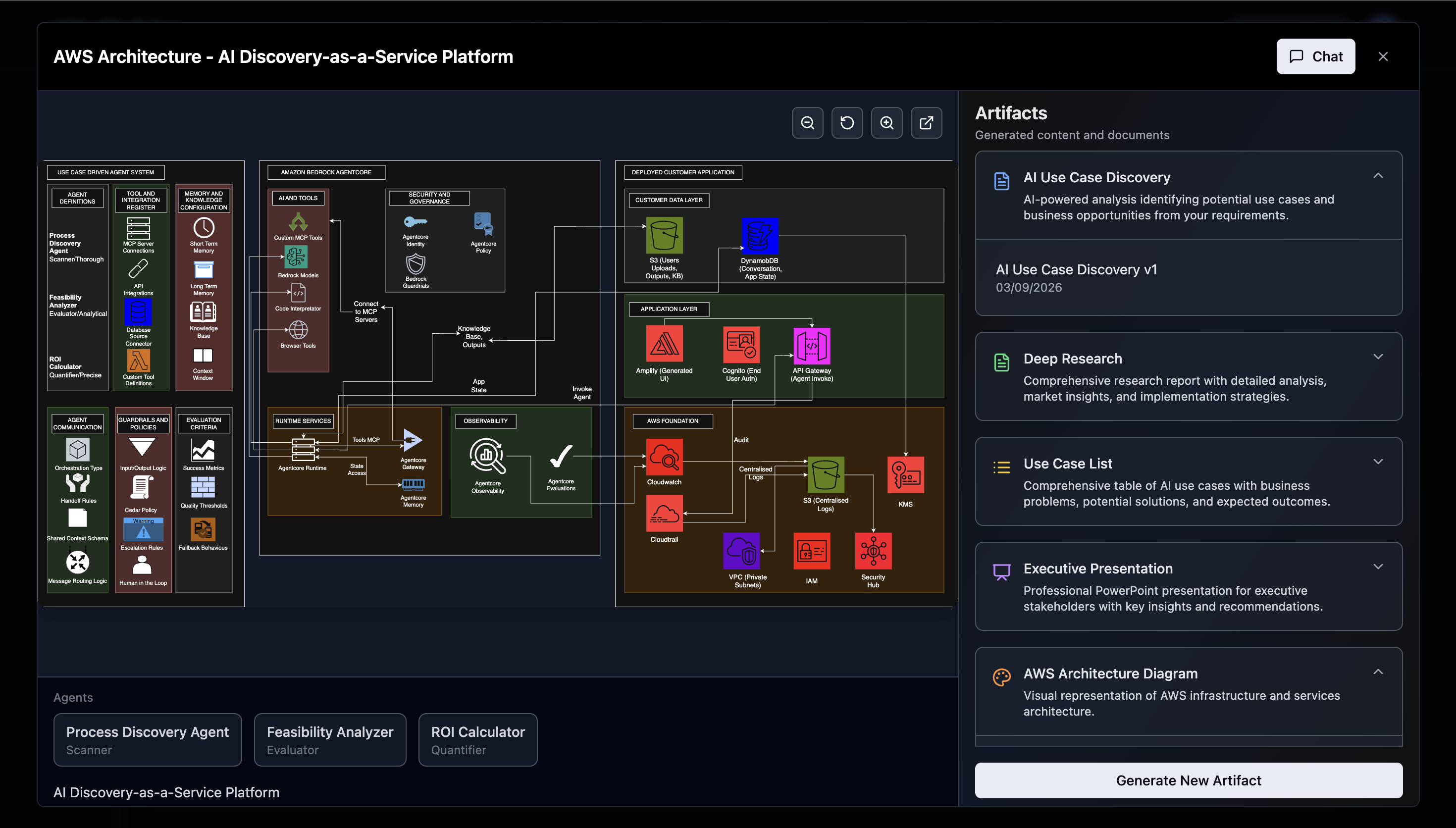
The AWS Architecture Diagram is generated per use case. Select a use case from the dropdown in the generation form, click Generate, and the diagram renders as an interactive canvas.
The diagram shows three main zones:
| Zone | What It Contains |
|---|---|
| Use Case Driven Agent System | Agent definitions, tool integrations, memory/knowledge config, guardrails, evaluation criteria |
| Amazon Bedrock AgentCore | AI tools, runtime services, security & governance, observability |
| Deployed Customer Application | Customer data layer (S3, DynamoDB), application layer (Amplify, Cognito, API Gateway), AWS foundation |
At the bottom of the diagram, agent chips show the individual agents for that use case (e.g. Process Discovery Agent, Feasibility Analyzer, ROI Calculator) with their role classification.
Viewer controls: zoom in/out, reset, open in external editor. Click Chat to ask questions about the architecture.
Artifact Deep Dives
AI Use Case Discovery
Structured assessment of your business translated into prioritised AI opportunities. Contains:
- Executive summary with market statistics
- Use Case Decision Matrix scored across Business Value, Feasibility, Risk, ROI timeline, Time-to-Impact
- Impact deep-dives with technical approach and implementation timelines per use case
- Agentic system architecture diagrams
- Risk heatmap (Likelihood x Impact)
- AI Capability Maturity rating across 6 dimensions
- Three-phase Adoption Roadmap (Foundation, Market Entry, Scale)
- Tech-Business Alignment matrix
- Strategic recommendations with KPIs
Deep Research
25+ page market intelligence document with live web research and cited references. Contains:
- Competitive positioning within the AWS partner ecosystem
- Industry-specific opportunity assessments
- Platform strategy recommendations with gap analysis
- Strategic technology roadmap (Agentic AI, multi-agent orchestration, RAG 2.0, edge computing)
- Live citations from authoritative sources with full bibliography
- Market size statistics and sector-specific ROI benchmarks
Use Case List
Concise structured PDF covering 10-12 use cases in a consistent three-part format:
- Business Problem - specific challenge with quantified impact
- Potential AI Solution - proposed approach, technology components, integration points
- Expected Outcome - efficiency gains, cost savings, revenue impact, time-to-value
Executive Presentation
10-slide PowerPoint automatically generated from your AI Discovery Report:
| Slide | Content |
|---|---|
| 1 | Title - company name, "AI Discovery & Roadmap" |
| 2 | Executive Summary |
| 3 | Market Context |
| 4-6 | Top 3 priority use cases (solution overview, business impact, implementation) |
| 7 | Risk Assessment |
| 8 | AI Maturity scores |
| 9 | Roadmap |
| 10 | Recommendations |
Downloadable as PPTX. Tone options: Professional, Executive, Technical.
Advanced Usage
Writing Effective Custom Instructions
The Instructions field accepts natural language. The more specific the instruction, the more targeted the output.
| Goal | Example Instruction |
|---|---|
| Audience change | "Rewrite for a non-technical board audience - remove technical acronyms and lead with business outcomes" |
| Vertical focus | "Focus the analysis on Financial Services - include FCA regulatory context and open banking opportunities" |
| Depth adjustment | "Expand the ROI section with more detailed calculation methodology and assumptions" |
| Length control | "Compress to 8 pages - keep the decision matrix and top 3 use cases, cut the rest" |
| Tone shift | "Switch tone from analytical to persuasive - we need this for a sales conversation" |
| Section addition | "Add a data governance section covering GDPR implications and retention policies" |
Targeting Different Audiences
A common pattern is generating parallel variants of the same artifact for different audiences:
| Variant | Instruction Approach |
|---|---|
| Technical team | "Keep all architecture diagrams and technical detail - expand the implementation methodology" |
| C-suite | "Lead with quantified business outcomes and ROI. Minimise technical implementation detail" |
| Board presentation | "Executive summary format - strategic framing, risk, and roadmap in under 5 pages" |
| Sales conversation | "Persuasive tone, competitive differentiation framing, emphasis on time-to-value" |
Each variant is saved as a separate versioned artifact under the same category - none overwrite each other.
AI Chat Cross-Referencing
The AI Chat responds based on whichever artifact is currently open in the viewer. To compare insights across artifacts:
- Open the first artifact (e.g., AI Discovery Report)
- Ask the AI Chat a question
- Switch to a second artifact (e.g., Deep Research)
- Ask the same question - the AI Chat now answers from the second document's context
What Good Looks Like
- The auto-generated artifacts have been read, not just downloaded
- Each regeneration was driven by a named audience, and the instruction says what to change rather than asking for something better
- Versions are stacking up under their categories, so you can show how the argument changed rather than only where it ended
- An Executive Presentation exists for the people who approve the spend, and an AWS Architecture Diagram exists for the use case you intend to build
- The claims in the artifacts match what your team concluded on the Jamming Board
Where This Leads
- AI Chat Assistant - interrogate any open artifact instead of reading it end to end
- Reading Your Readiness Reports - what the six scored PDFs from the full route are each for
- Choosing Your First Use Case - use the decision matrix and feasibility findings to close out Envision