Jamming Board
Where Envision use cases land - review, rate, comment, and prioritize them with your team before choosing one to build.
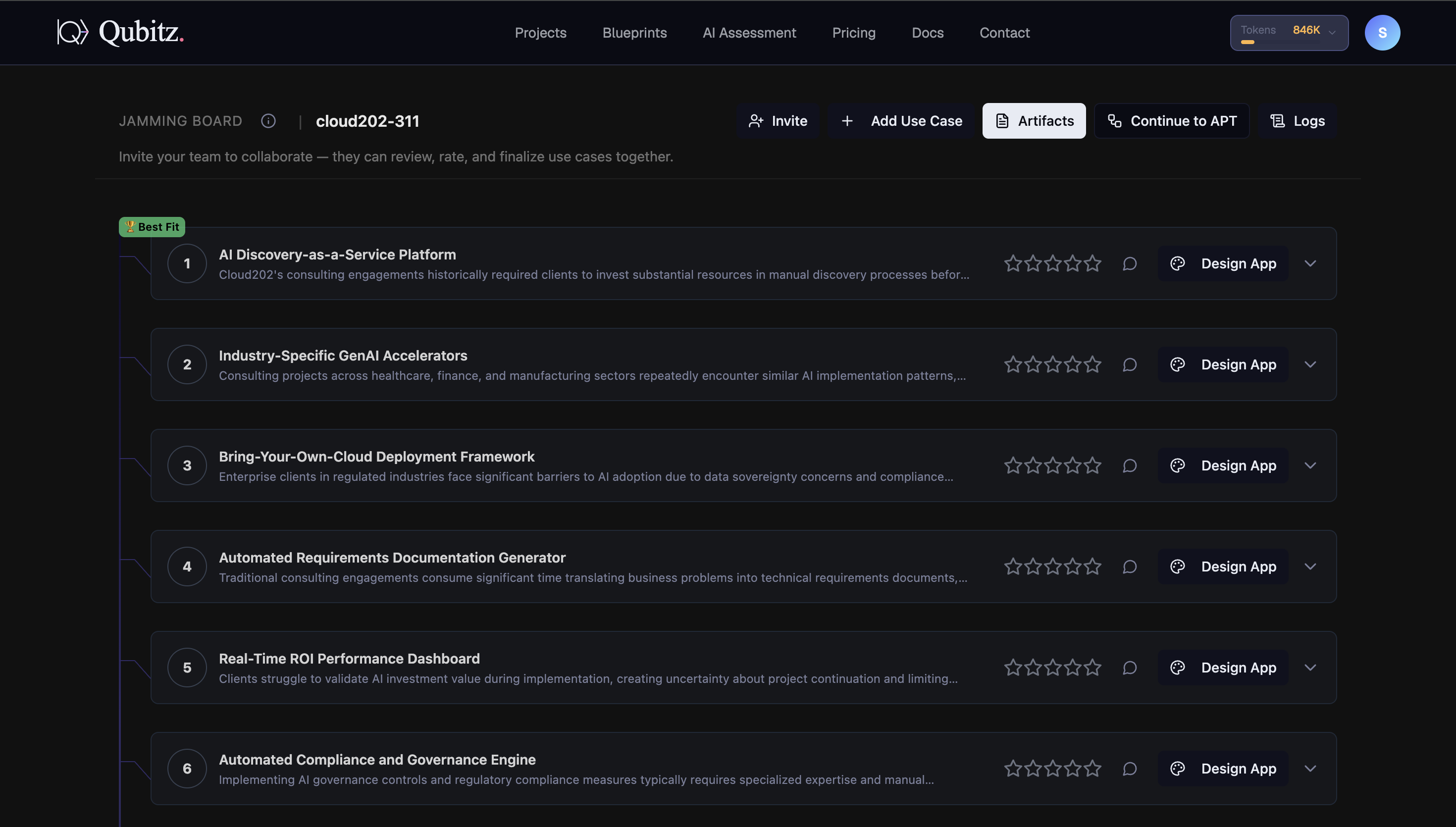
The Jamming Board is the collaborative workspace where your AI-generated use cases land after an assessment run. Your team can review, rate, comment on, and prioritize use cases here - and then take the winning use case into Control Hub to build it.
The Outcome
A use case list your team has genuinely argued over, ranked by their ratings and comments rather than by the model alone.
Before You Start
You need a completed assessment run - see Getting Started. The board is populated by the pipeline, not created by hand.
Decide who should be in the room before you open it. Ranking is driven by star ratings and comment sentiment, so a board only one person has touched tells you nothing you did not already know. You can invite up to 10 collaborators per project.
If you ran the full AI Readiness route, open the six reports in the Artifacts panel alongside the board - they are what turns opinion into an argument.
Start Here
Click Invite in the top bar and add the people whose judgement will decide this. Rate and comment after they do, not before.
Header Actions
The top bar shows your project ID (e.g. cloud202-311) and five action buttons:
| Button | What It Does |
|---|---|
| Invite | Send email invitations so team members can review and rate use cases with you |
| + Add Use Case | Manually add a use case the AI missed |
| Artifacts | Open the Artifacts panel - view and download your generated reports and PDFs |
| Continue to APT | Launch the Agentic Process Transformation view to map and automate your business processes |
| Logs | View the pipeline execution log for this assessment run |
Use Case List
Use cases are displayed in a numbered vertical list, ranked by combined rating and sentiment score. The top-ranked use case receives a green Best Fit badge (trophy icon) - this updates automatically as ratings and comments change.
Each row shows:
| Element | Description |
|---|---|
| Number | Sequential rank position |
| Title | Use case name |
| Description | Short preview of the use case description |
| Star Rating | 5-star rating - click to rate, aggregate reflects team consensus |
| Comments | Open the threaded discussion for this use case |
| Globe | View linked research or external references for this use case |
| Design App | Pick this use case and open Control Hub to start building your agent system |
| Expand arrow | Expand the row to see full details |
Collaboration
| Feature | Description |
|---|---|
| Star Ratings | Each team member rates independently 1-5 stars. Aggregate score drives ranking. |
| Comments | Thread-based discussion per use case. Sentiment analysis runs on comments and affects ranking. |
| Best Fit Badge | Auto-assigned to the #1 ranked use case. Cannot be manually reassigned. |
| Invite | Up to 10 collaborators per project. Invitations sent via email - collaborators must accept to gain access. |
Positive comments boost a use case's rank. Negative comments lower it. Combined with star ratings, this reflects genuine team consensus.
Expanding a Card
Click the expand arrow on any use case row to see the full details:
- Description
- Business Value
- Implementation Timeline
- Estimated ROI
- Impact Score
- Sentiment Score
Clicking Design App on any use case creates a new application linked to that use case and your research reports, then opens Control Hub to design the agentic system.
Inviting Collaborators
Click Invite in the top bar. The Invite Collaborators dialog opens.
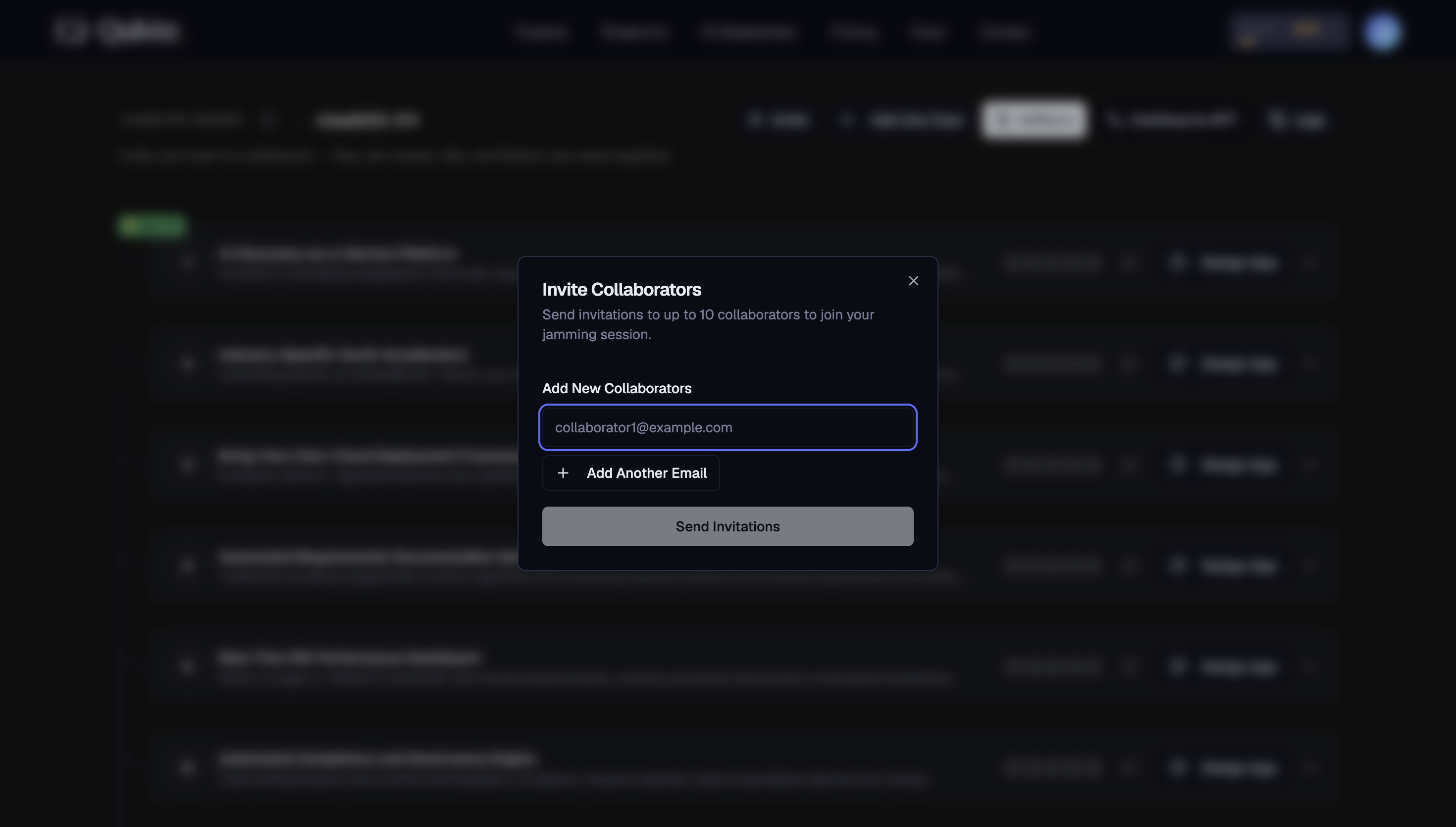
Send invitations to up to 10 collaborators to join your jamming session.
Add New Collaborators
Enter the collaborator's email address in the input field.
Add more (optional)
Click + Add Another Email to add additional recipients.
Send Invitations
Click Send Invitations to send to all entered addresses.
- Maximum 10 collaborators per project
- Invitations sent via email - collaborators must accept to gain access
- Only the project owner and existing members can see the project
Agentic Process Transformation
The Continue to APT button opens the Agentic Process Transformation workspace. It reads your IT application inventory (uploaded during AI Assessment) and proposes the right agentic execution pattern for each application - Deterministic, Agent as Tool, or Other. You review and approve each proposal. If you ran the full AI Readiness (Yes) route, Agentic Process Transformation starts generating in the background while you answer questions, so proposals are often ready when you arrive.
See Agentic Process Transformation for the full guide.
Design App
Clicking Design App on any use case creates a new application linked to that use case and your research reports, then takes you directly to Control Hub to start designing your agent system.
What Good Looks Like
- More than one person has rated the list, so the ranking reflects a team view rather than yours alone
- The top few use cases carry comments, not just stars - the reasoning is written down where the next reader can see it
- Anything the assessment missed has been added with + Add Use Case and rated on the same terms
- You would defend the use case wearing the Best Fit badge in front of a sponsor
- Expanded cards have been read, so business value, timeline, and ROI are part of the discussion
Where This Leads
- Choosing Your First Use Case - the ranking is an input, not the decision; this is how to make the call and close Envision
- Agentic Process Transformation - check that the work behind your chosen use case actually needs an agent before you build one
- Artifacts - generate the deliverables that carry your decision to the people who have to approve it