Agentic System
Configure the agents that run your workflows - roles, models, tools, memory, and guardrails.
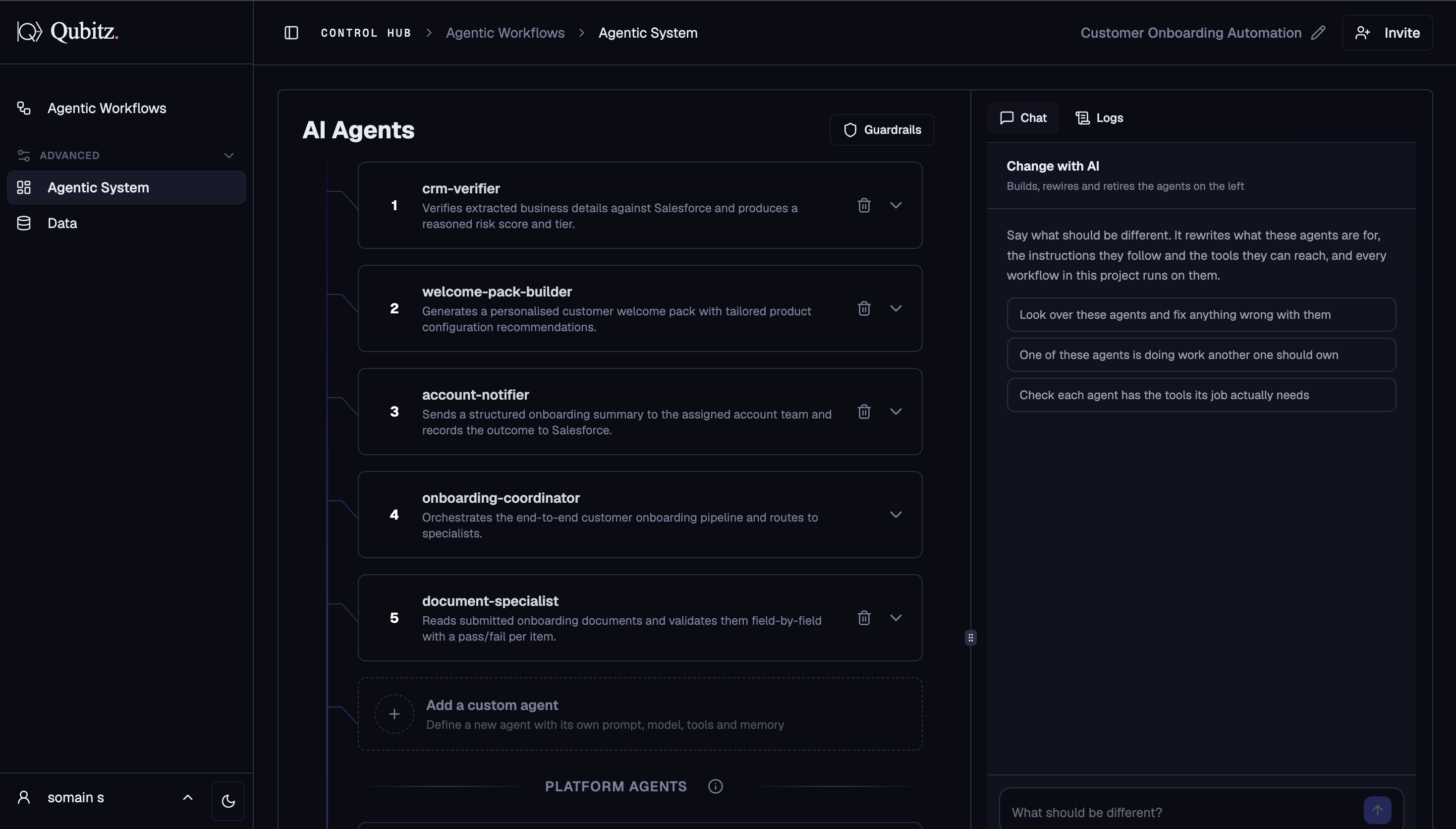
The Agentic System tab is where you design and configure your multi-agent system. It is powered by the Workflow Architect running in agent-design mode. The layout is a two-panel view: agent configuration cards on the left, and a Change with AI / Logs panel on the right.
The Outcome
A roster of agents where each one has a single clear job, the model to do it, and only the tools that job needs.
Before You Start
Design workflows first. The Workflow Architect generates agents from your use case and workflow plans, so editing agents before the plans are settled means editing them twice - see Agentic Workflows.
Two Align decisions land directly in this tab:
- The RAG and MCP tools you give an agent draw on the collections and connections set up in Align - see Tool Integrations
- Guardrails here are the content-safety half of the boundaries you set in Governance & Guardrails
Be aware before you edit: once the spec is ready, deployment fires automatically. There is no manual Approve step between a change here and a deployed change.
Start Here
Expand each generated agent card and ask one question per agent: what does this agent own that no other agent owns? Overlapping responsibilities are the most common failure in a generated roster, and the quick-start prompt "One of these agents is doing work another one should own" in the Change with AI panel exists for exactly this.
How It Works
When you enter the Agentic System tab, the Workflow Architect connects via WebSocket and generates a multi-agent architecture spec based on your use case. It produces a set of specialized agents, each with a defined role, model, tools, memory, and system prompt. Once the spec is ready, deployment fires automatically - there is no manual Approve button.
Agent Cards
Each agent appears as a numbered card. Expand any card to view and edit:
- Name & Description - agent identity and role
- Model - 24+ models available:
- Anthropic: Claude Opus 5, Claude Sonnet 4.5, Claude Haiku 4.5
- Amazon Nova: Nova Pro, Nova Lite, Nova Micro, Nova Sonic (voice)
- Meta Llama 3.3, Llama 3.2
- Mistral Large, Mistral Small
- NVIDIA Llama 3.1 Nemotron Ultra
- Qwen 2.5 series, MiniMax, Z.AI GLM
- Tools - RAG, MCP, Web Search, Generate Report, Text to Speech, Speech to Text, Video tools
- Memory - Short-term (session) or Long-term (persistent across sessions)
- Visibility - Both, User Only, or Admin Only
- System Prompt - the full agent prompt, editable inline
- Agent as a Tool - which other agents this agent can call as sub-agents
Add a Custom Agent
The Add a custom agent card at the bottom of the list lets you define a brand-new agent from scratch with its own prompt, model, tools, and memory - without going through the Workflow Architect.
Platform Agents
System-level agents that handle infrastructure, security, and observability automatically. Toggle them on or off independently from your custom agents.
Change with AI Panel
The right panel has two modes:
Change with AI - describe what should be different in plain English. The panel rewrites what these agents are for, the instructions they follow, and the tools they can reach. Quick-start prompts are pre-filled to help you get started:
- "Look over these agents and fix anything wrong with them"
- "One of these agents is doing work another one should own"
- "Check each agent has the tools its job actually needs"
Logs - view real-time execution logs from the agent runtime.
Guardrails
The Guardrails button (top right of the Agentic System tab) opens content safety configuration. Set rules that apply across all agents in this project to filter harmful content, enforce topic boundaries, and control output behavior.
Workflow Limits
These limits apply across both the Agentic Workflows tab and the Agentic System tab:
| Limit | Value |
|---|---|
| Workflows per project | 30 |
| Total storage per project | 300 KB |
| Storage per workflow | 24 KB |
The platform warns you before a save would exceed the cap so you can delete unused workflows first.
What Good Looks Like
- No two agents own the same responsibility
- Each agent's tool list is the minimum its job needs, not everything available
- Memory is set deliberately per agent - long-term only where an agent genuinely needs to remember across sessions
- Visibility is set per agent, so admin-only agents are not exposed to end users
- Guardrails have been opened and configured, not left untouched