AI Assessment
Run an AI readiness assessment for any company - describe your business in a chat, complete Business Requirements, and receive six scored PDF reports.
AI Assessment is accessible from the top navigation bar. It opens a chat-based intake that collects your business context through conversation, tracks completeness in a Business Requirements left panel, and then runs a full AI readiness assessment with six scored PDF reports.
This is the Envision stage of the four-stage cycle - it establishes where you stand before any use case is chosen.
The Outcome
You know your AI readiness, what is blocking you, and whether the business case holds - backed by six reports you can show to other people.
Before You Start
You need a business email. Personal email domains are blocked at signup and at the Use Case Tool form.
Nothing else is required. The platform researches the company itself - but the quality of the output tracks the quality of what you tell it, particularly in the HIGH-SIGNAL fields below.
If you already know which problem you are solving and do not need the reports, Choose Your Path covers the faster routes.
Start Here
Type the company name and context into the chat, and let the Business Requirements panel fill before clicking Initiate assessment.
The single highest-leverage thing you can do is answer Biggest time/cost drains specifically. It is the strongest signal into the whole assessment, and a vague answer there degrades every report that follows.
Layout
The page has two areas:
- Left panel - Business Requirements tracker. Shows your progress across five groups as you answer questions in chat
- Centre - Chat interface. Describe the company and problem you are assessing, and the platform gathers the context it needs through natural conversation
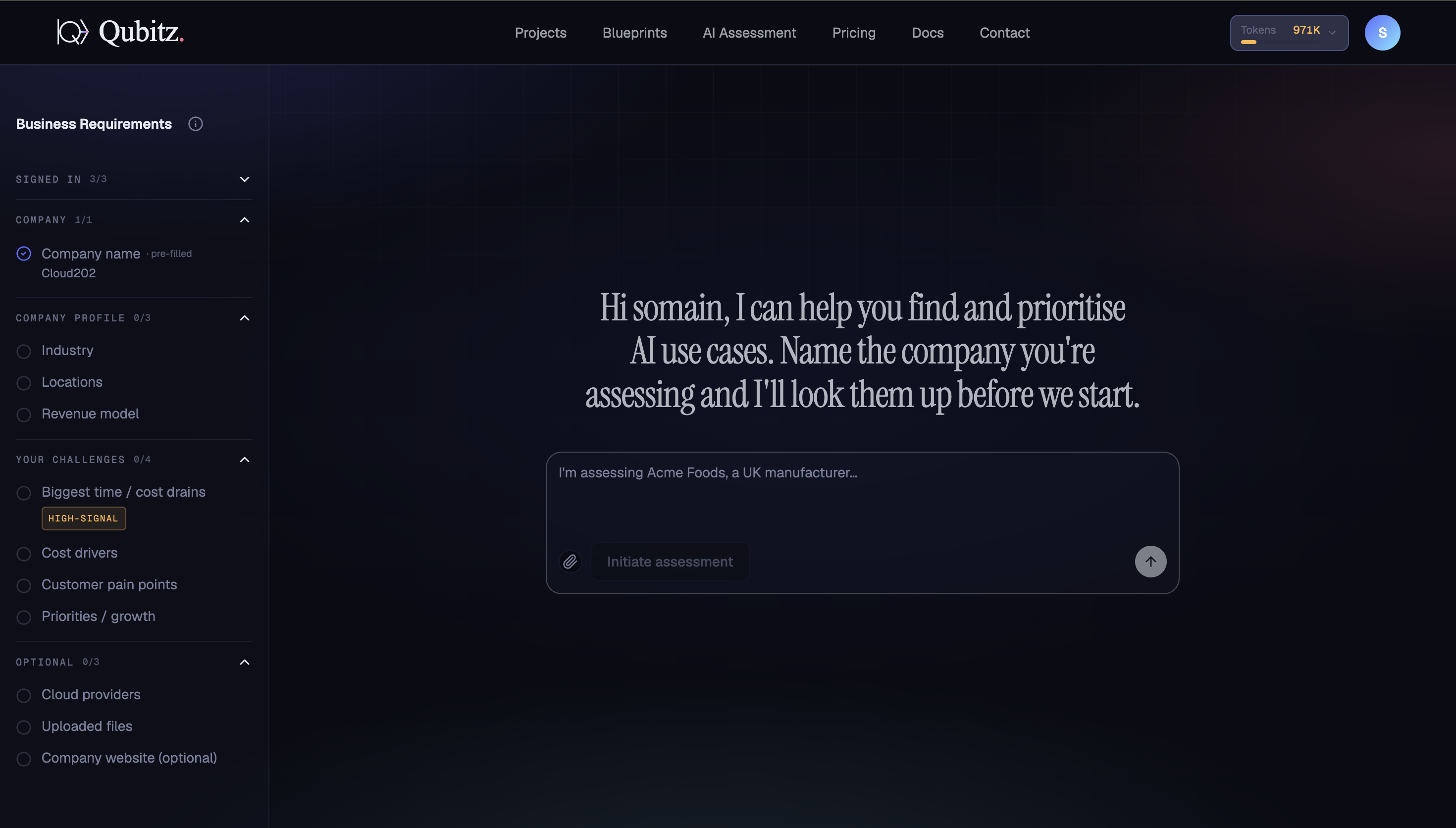
Business Requirements
The left panel tracks five groups of context, each with a completion counter:
| Group | Fields |
|---|---|
| SIGNED IN | Confirms your account details (pre-filled) |
| COMPANY | Company name (pre-filled from your account) |
| COMPANY PROFILE | Industry, Locations, Revenue model |
| YOUR CHALLENGES | Biggest time/cost drains (HIGH-SIGNAL), Cost drivers, Customer pain points, Priorities/growth |
| OPTIONAL | Cloud providers, Uploaded files, Company website |
HIGH-SIGNAL fields carry the most weight in the assessment output. Fill in your biggest time and cost drains as specifically as possible.
Starting an Assessment
Type the name and context of the company you are assessing in the chat input and click Initiate assessment. For example:
"I'm assessing Acme Foods, a UK manufacturer…"
The platform looks the company up, pre-fills what it can in the Business Requirements panel, and begins asking follow-up questions to complete the remaining fields. Answer conversationally - the panel fills in as you go.
Once the Business Requirements panel has enough context (the tracker shows sufficient completion), the Initiate assessment button becomes the primary action to launch the full assessment run.
Initiate Assessment Dialog
Clicking Initiate assessment opens a route-selection dialog before anything begins generating.
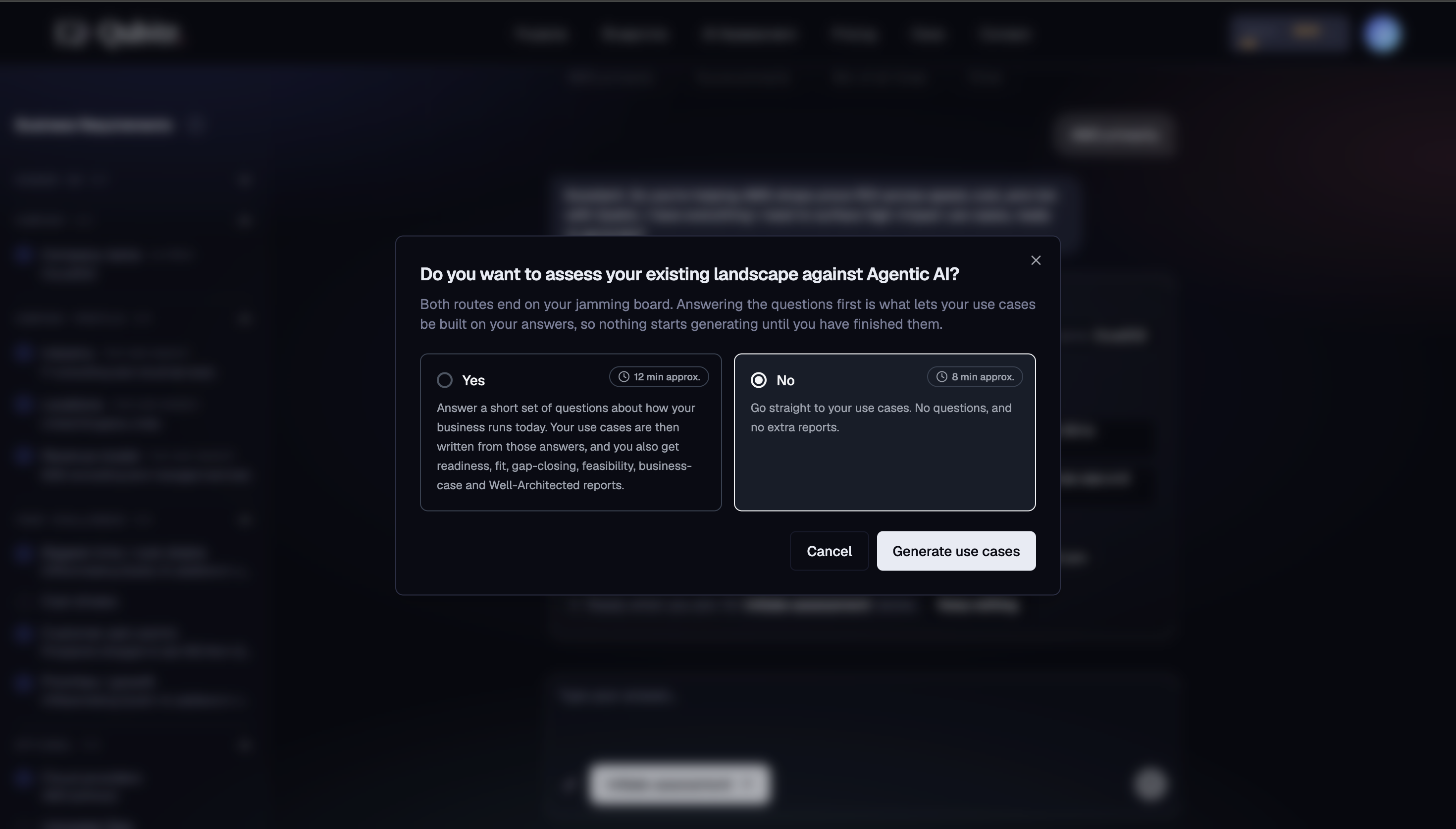
Do you want to assess your existing landscape against Agentic AI?
You choose between two routes:
| Route | Time | What You Get |
|---|---|---|
| Yes | ~12 min | Answer a short set of questions about how your business runs today. Use cases are written from those answers. You also get readiness, fit, gap-closing, feasibility, business-case, and Well-Architected reports. |
| No | ~8 min | Go straight to use case generation. No questions, no extra reports. |
Both routes end on your Jamming Board. The "Yes" path produces significantly richer output because the use cases are grounded in your actual answers - nothing starts generating until you have finished the questions.
Click Generate use cases to confirm your choice and begin.
The Assessment Run
After confirming, the platform runs two things in parallel:
1. Use case discovery - researches the company, identifies AI opportunities, and generates your use case list
2. AI Readiness Assessment - an adaptive Q&A modal opens and works through approximately 8-16 questions across six categories:
- Organization & Strategy
- Tech Infrastructure
- Data Readiness
- Team & Skills
- Compliance
- AI Initiatives
Questions are generated one at a time, tailored to what you have already shared. The platform pre-fills answers where it can (shown with a confidence badge) - edit them before advancing. Use Back to revisit any previous answer.
Before the questions start, you can upload supporting documents to improve question quality and report accuracy:
- Current State Architecture
- Compliance & Security Policies
- IT Roadmap / Strategic Plan
- Legacy System Documentation
- IT Infrastructure Inventory
- Application Inventory
Six AI Readiness Reports
When the Q&A is complete, six PDF reports are generated in parallel (~3-4 minutes):
| Report | What It Covers |
|---|---|
| Revised Priority Use Cases | Top use cases scored and contextualised for your business |
| Platform Decision | AgentCore vs Amazon Q recommendation based on your requirements |
| Gap Mitigation Plan | Steps to close readiness gaps across AWS B/C/D/E/F dimensions |
| AWS Fit Feasibility Report | Technical feasibility against AWS Checklist 3.1/3.2 |
| ROI Modeling Report | FTE savings, cost/benefit analysis, and business case |
| Well-Architected Review | Assessment across all six AWS Well-Architected pillars |
Reports land on your Jamming Board alongside your use cases when ready.
What Good Looks Like
- The Business Requirements tracker is complete, not just sufficient - especially the HIGH-SIGNAL fields
- You uploaded supporting documents if you had them, rather than relying on the platform's research alone
- Pre-filled answers were reviewed and corrected, not accepted on the confidence badge alone
- All six reports generated, and someone has actually opened the Gap Mitigation Plan
Where This Leads
- Reading Your Readiness Reports - what each report is for, who owns it, and what decision it supports
- Jamming Board - still in Envision, where your team rates and ranks the use cases this produced
If the Gap Mitigation Plan surfaced blockers in data or compliance, address them in Align before building - see Data and Governance & Guardrails.